
Settings
Open Settings from the tray menu, from the Library’s Settings button, or with ⌘, / Ctrl+, in the Library window. The window has a sidebar with six panes. The app remembers which pane you looked at last.
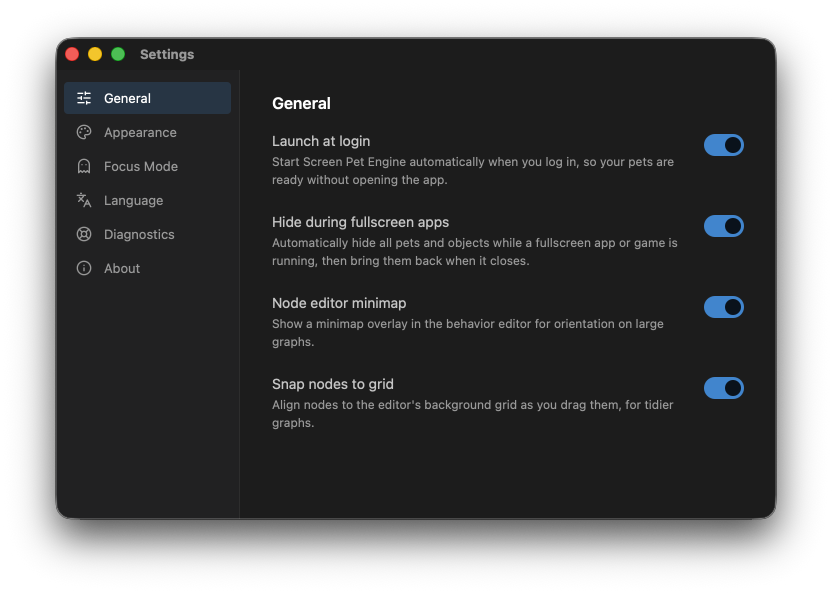
General
Section titled “General”Five on/off switches:
- Launch at login. Start Screen Pet Engine automatically when you sign in to your computer.
- Hide All Pets. The master switch (also on the tray menu) that hides every live pet and object at once without turning them off. Toggle it back and they all return. See The system tray & everyday controls.
- Hide during fullscreen apps (on by default). Automatically hide all pets and objects while a fullscreen app or game is running, then bring them back when it closes.
- Node editor minimap (on by default). Show a small overview map in the corner of the behavior graph editor. (Only affects the editor.)
- Snap nodes to grid (on by default). Align nodes to the editor’s background grid as you drag them, for tidier graphs.
Appearance
Section titled “Appearance”- Accent color. Choose the highlight color used throughout the app: Blue (default), Honey, Teal, or Coral. The change applies everywhere instantly.
The app uses a dark theme; only the accent is adjustable in this build.
Focus Mode
Section titled “Focus Mode”- Focus Mode. The master toggle (also on the tray menu). When on, pets and objects become click-through so they never block your work, and cannot be dragged until you turn it off.
- Ghost Opacity (macOS only). How faint a pet becomes while your cursor hovers over it in Focus Mode. Lower is more transparent. Only active when Focus Mode is on.
- On Windows, a note explains that a hovered pet hides instead of dimming, a limitation of how click-through windows work there.
See The system tray & everyday controls for what Focus Mode does day to day.
Language
Section titled “Language”- Pick your language: English, 日本語 (Japanese), Español (Spanish), 繁體中文 (Traditional Chinese), or 简体中文 (Simplified Chinese). Each is shown in its own script, and the change applies live across every window and the tray menu.
Diagnostics
Section titled “Diagnostics”If something goes wrong, this pane helps you send us useful information.
- Export logs. Saves your most recent log files to a
.zipyou can attach to a bug report. A confirmation dialog appears first, with a Hide my account name option that redacts your home-folder path from the logs (off by default). You then choose where to save. The default filename looks likescreen-pet-engine-logs-2026-07-11.zip. - Get help on Discord. Opens the community Discord.
You can jump straight here from the tray menu’s Report a problem… item.
- The app name, current version, a one-line description, and a link to join the Discord community.
Use the version number when reporting issues so we know exactly which build you are running.